
Overview
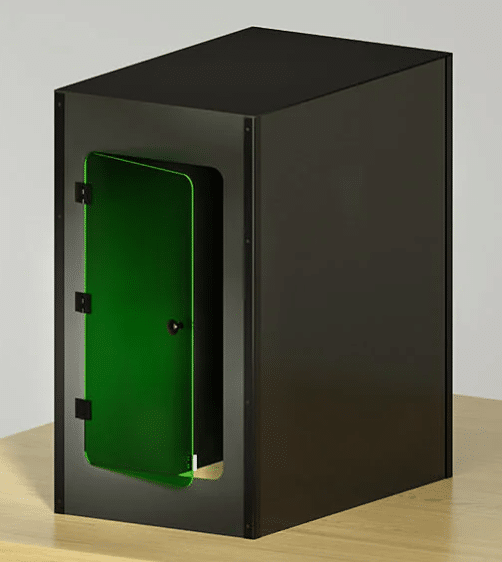
The StellarNet Laser Safety Enclosure provides a controlled, secure environment for operating Class 3B and Class 4 laser systems. It helps protect users from accidental exposure by fully enclosing the system within a light-tight structure made of laser-rated materials.
Key features include:
- An amber or green window, rated for either 532 nm (amber) or 785–1064 nm (green) wavelengths, depending on the laser system requirements, for safe visual monitoring during operation.
- A front-access door with a magnetic latch for secure and convenient access.
- Cable passthrough grommets to route power and data lines while maintaining the enclosure’s light seal.
- Optional interlock compatibility for systems that support laser interlocking.
Assembly Instructions
This section provides a high-level overview of the enclosure setup. For detailed diagrams and step-by-step instructions, please refer to the Safety Enclosure Pro User Manual included with your enclosure.
- Place the enclosure on a clean, flat, and stable surface. Ensure there’s enough clearance around it for the front door to open and for cable access.
- Begin assembly by attaching the side, back, and top panels using the provided screws. Panels are aligned using pre-drilled holes for straightforward positioning.
- Install the front panel with the magnetic-latching door. Ensure the viewing window is clean and correctly oriented.
- Use the provided grommets to route power or data cables through the passthrough openings. Do not run cables through unsealed gaps between panels.
- Connect the wires of the supplied interlock cable to the door panel sensor (Black → COM, Red → NO), then plug the connector into the laser’s interlock port.
- Use the enclosed brackets to securely attach the enclosure to the table or testing surface. This prevents accidental lifting or movement during laser operation, reducing the risk of damage or exposure.
For safe laser operation and usage guidelines, refer to the Laser User Manual.
For any questions or technical assistance, please contact us via email at ContactUs@stellarnet.us or visit our website at www.stellarnet.us for additional resources and support.