
StellarNet Technical Support & Services
FAQ, Repairs, Re-Calibrations, & Extended Support Technical Support or RMA Request FormStellarNet’s technicians are happy to help you with any questions that you might have. Check our software download page to get the most current software update. Before contacting us, make sure that you have had time to read the supplied instruction manual and view the Training Videos found on your USB stick delivered with your spectrometer. This will help you become more familiar with the software and various applications.
StellarNet User Manual by Chapter
01 Table of Contents & Introduction
02 Spectrometer Driver and Software Installation
03 Quickstart SpectraWiz Software
04 Quickstart Guides for Modular Systems
05 Quickstart Guides for Open and Measure Analyzers
06 Spectrometer Upgrades and Features
07 Additional Software and Features
StellarNet User Manual
StellarRAD User Manual
Frequently Asked Questions
I have tried installing the SWdrivers.zip and SWdriver64.exe files and I get the following error: 'PnPUtil.exe' is not recognized as an internal or external command, operable program or batch file.
- A command prompt will pop up and look like there is an error message but it is normal if it looks like the image below
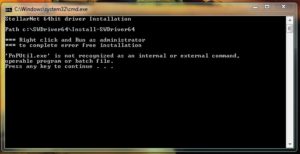
- Now you need to open windows explorer
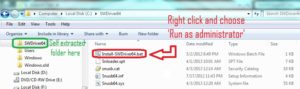
- Right click on the start menu and choose “open windows explorer”
- In the left hand panel, scroll down to the C: drive and left click on it to display its contents in the right hand panel
- There should be a folder called SWDriver64
- Open this folder
- Right click on Install-SWDriver64.bat
- Choose “Run as administrator”
Startup problem on chan2
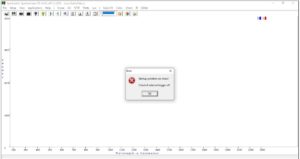
If you experience this error with dual channel zAP systems please follow the sequence to fix.
- Make sure the VIS channel is always connected to the 1st USB port of your device and the NIR is on the 2nd USB port.
- Close SpectraWiz. Unplug channel one and two and then plug them back in 1 at a time, while waiting 3 seconds each. Start SpectraWiz.
- Close SpectraWiz. Delete the sw.ini file from your C:\Program Files\StellarNet\SpectraWiz directory. This will reset the USB configuration.
I don’t see a signal
- Verify that your spectrometer’s green light is illuminated
- Check to see you are not zoomed in on a localize portion of the spectrum. Right click on the Y-axis to zoom out & verify that you are looking at the entire x-axis range of your spectro
- Right click on the Dark Light Bulb on the top tab to release any previously saved dark spectra
- Inspect fiber optic cable to make sure it is not broken.
- Perform a cable reset: Close SpectraWiz, disconnect your USB cable, wait 15 seconds, plug back in your USB cable, wait 15 seconds, launch SpectraWiz
The green LED on my spectrometer does not turn on and I have no signal
- Make sure your spectrometer’s drivers are installed properly. Once correctly installed the spectrometer’s green light will illuminate. Please review the spectrometer driver installation instructions
My custom software using the LabVIEW, C, C#, or VB examples is not working
Make sure you are running the program as an administrator (right click-> Run as administrator). Running as administrator fixes 99% of all custom written software issues because it allows programs unlimited access to read and write to the C:\Program Files\StellarNet\SpectraWiz directory.
I get the error message “USB device not present” and/or “Scan Timeout.”
- Check to see if unit has power and if the USB driver is recognized (green light).
- Check to see if the cables are listed in the Windows Device Manager under USBDEV.
- Check to see if USB or USB2EPP(older spectrometers) cable is firmly inserted in back of unit and USB port of computer.
- Close SpectraWiz and perform a reboot of USB driver using the following steps.
1) Unplug the power cord from the spectrometer (if it has one).
2) Unplug the USB or USB2EPP(older spectrometers) cable from the spectrometer.
3) Unplug the USB or USB2EPP(older spectrometers) cable from the computer.
4) Plug the USB or USB2EPP(older spectrometers) into the spectrometer.
5) Plug power supply into spectrometer (if it requires external power).
6) Plug the USB or USB2EPP(older spectrometers) into the computer
My GREEN-Wave spectrometer does not have a Green LED and I cannot get it to work
- Some GREEN-Wave models have obsolete electronics cards. ContactUs@StellarNet.us to learn about possible upgrades and solutions for your instrument.
I can’t find my calibration file
- All modern StellarNet calibration files are shipped with the spectrometer on a USB stick as an executable self-extracting zip file. File names typically start with MyCAL and are dropped in the SWCals folder in the SpectraWiz directory.
- If you have lost your calibration file we can replace it for you. ContactUs@StellarNet.us or fill the form below
I think my calibration is older than one year
- If your calibration is older than one year, we recommend that you call in and request to speak with an Applications Scientist about a re-calibration service. Annual calibrations are a good practice and healthy way to check up on your spectrometer system health.
I saved my files in the SpectraWiz directory but I can't seem to find them!
- If you are not running SpectraWiz as an administrator (depending on your operating system) your files may be being saved to your virtual directory located C:\Users\YOU\AppData\Local\VirtualStore\Program Files\StellarNet\SpectraWiz
I get the following error: “I/O 32.”
- Delete the swref1 and swdark files from the SpectraWiz directory.
My unit is not displaying the correct wavelength range.
- Ensure coefficients and interface parameters have been entered correctly.
- Make sure spectrometer is not running off of computer power (via USB cable).
- Turn zoom off by left-clicking to the left of the y-axis.
- Uncheck the Multiplexer option: Set-up è Spectrometer channels è Fiber Optic Multiplexer.
I get a “Range Error” when in Irradiance mode.
- Back away the unit from the light source (if possible).
- Install a calibrated aperture.
- Decrease the integration time.
My measurements don’t look right (using the R400 reflectance probe).
- Insert the end of the y-fiber with 6 fibers bundled into the light source. Insert the other end into the spectrometer (to get the most amount of light onto the sample).
- Block any overhead lights from the probe.
- Make sure the reference is not oversaturated.
I get the following error “Reference Oversaturated at xxx nm.”
- Decrease the integration time.
- Back the light source away from the unit (if possible).
I’m having difficulty with my port settings.
- We no longer support devices using parallel ports. Purchase our USB2EPP cable to run the spectrometer from USB-1 or USB-2 ports.
Is my Spectrometer calibrated for Irradiance measurements?
- A USB stick is sent with all calibrated units. Check your computer for a file called MyCal (with your unit’s serial number in the file name).
Glossary of StellarNet Spectroscopy Terms
Looking for the most current software update?
Can’t find an answer?
Use the form here and be sure to include the unit you are using (or supply the invoice number it was purchase under) and what you are trying to measure. If possible, attach a screenshot of the item in question and the file “sw.ini” found in the SpectraWiz directory.
StellarNet’s technicians are happy to help you with any questions that you might have. Before contacting us, make sure that you have had time to read the supplied instruction manual, view the Training Videos found on the your USB stick and check out Frequently Asked Questions.
Re-Calibration Services for Spectrometers and Lamps
We offer a variety of NIST traceable calibration services for our customers. StellarNet spectrometers are built rugged and often hold a calibration for many years! However, many customers prefer to get annual checkups and re-calibrations. This is a great way to ensure your system is maintained and the data you are taking is accurate. If you have questions or need a rush service, contact us today!
RE-CAL Annual NIST traceable spectrometer calibration service, instrument inspection, and x-axis realignment. Choose one from any of our Standard Calibration Services including IRRAD-CAL for spectral irradiance, RAD-CAL-SR for spectral radiance, RAD-FLUX for radiant flux, and low light calibration options. Each additional calibration is $350 with an option for a calibration certificate. $700
SL1 RE-CAL Annual NIST traceable calibration service for the SL1 Tungsten Halogen Lamp $450
SL3 RE-CAL Annual NIST traceable calibration service for the SL3 Deuterium Lamp $450
IRRAD-CAL-Replacement File Copy of original calibration file supplied in electronic format by e-mail and/or replacement USB key. $150
Standard Calibrations
IRRAD-CAL Irradiance calibration service in Watts/m^2 using NIST traceable lamp that covers 300-1100nm. Requires fiber optic cable and cosine receptor attachment such as CR2, IC2, IS4, IS6, IS8, or IS20. $350
IRRADUV-CAL Irradiance calibration service for 200-600nm. Requires UV-SR fiber optic cable and CR2 cosine receptor $350
IRRADNIR-CAL SpectroRadiometric Calibration service for NIR range 900–1700nm $350
RAD-CAL Radiant power calibration in Watts/nm 300-1100nm or 900-1700 nm also for LED Lumens/nm $350
RAD-CAL-SR Radiance calibration in Watts/sr/m^2 for Candela (Cd/m^2/nm) – requires CR2-LENS $350
IRRAD-CAL-Low Low-light level calibration to measure 10x lower intensity emissions. Please specify wavelength range needed. Certification document not included. Please Note: Calibration replacement file costs $125.00.
$350
RAD-CAL-SR-Low Radiance calibration in Watts/sr/m^2 for low light Candela (Cd/m^2/nm) – requires CR2-LENS. Low light calibration performed with Lens assembly only $350
IRRAD-CAL-Fast Expedited Calibration Service guaranteed <1.5 weeks. Contact for availability $550
IRRAD-CAL-DOC Optional Calibration Certificate with details of calibration instrumentation and date and signature of calibration technician $175
Spectrometer Evaluation Service
StellarNet offers a Spectrometer Evaluation Service (SES) which can accompany an RMA for possible required repair. Typically once a technical support inquiry is submitted to our website, a customer will receive a response within 24 hours (often sooner). Our technical support representatives will work with the customer to try and solve their issue. Sometimes there is an immediate diagnosis of problem and an RMA for repair is issued. Other times the technical support representative can not determine if the problem is based on StellarNet hardware /software or the customers own application. In these cases, an RMA may be issued with an SES for StellarNet engineers to evaluate the system for functionality at our facility. If they system is found to be working properly then a fee is charged and the unit is returned. If the system is determined to be faulty, then based on if the system is still under warranty or not, the evaluation fee may be removed completely or deducted from repair costs.
SES Spectrometer Evaluation Service. If system is determined to be faulty this fee will be deducted from repair costs. $450
Extended Technical Support Packages
"Hey Billy Bob! This spectrometer we found from back in 2002 ain't working right. I can't get the darn software to load and I am not sure where to stick the probe!?"
StellarNet has been manufacturing rugged spectrometers to the worldwide market for over 20 years. We have many customers who find our general purpose spectrometers in their lab as "hand me downs". Companies may pass their spectrometer QC testing from employee to employee over the years OR some people may simply purchase our spectrometers second hand. Regardless if you have NO CLUE how to use the spectrometer sitting in front of you and you want some expert assistance, feel free to call us or fill out the form below and have some of our experts walk you through the system from start to finish.
Extended Support 1 Year Extended Support: RMA Troubleshooting and appropriate technical support for re-installation or other issues, not to exceed eight (8) billable hours. Any repairs are additional. 1 Year of Technical Support, not to exceed 8 billable hours. 295.00
Repairs & RMA Requests
Think something looks funny with your spectrum? Did you accidentally break your optical fiber? Fill out our Technical Support and Return Merchandise Authorization (RMA) request form below and a StellarNet technical support representative will contact you within 24 hours. If the cause the diagnosis can be made via email or phone then you will be issued an RMA for return and repair. Please print out your RMA form and include it in your shipment back to our facility:
Attention: Name of StellarNet Technical Support Rep
StellarNet, Inc.
14390 Carlson Circle
Tampa, Florida 33626
StellarNet Warranty Information
Spectrometers, light sources*, sampling accessories, and optical fibers & probes** are covered for manufacturing defects for one (1) year from the date of purchase from StellarNet.
* Light Sources have estimated lifetimes and therefore bulb replacement is customer responsibility
** Fiber optics inherently are fragile and can break when dropped, bent or smashed, this is not covered under manufacturer’s defect warranty.
Wizard-Care Extended Warranty Service Packages
Wizard-Care is an extended 1 year warranty package that offers an additional year of our manufacturers warranty to the life of your spectrometer. Additionally, Wizard-Care covers not only defects but also accidental damage to your spectrometer; giving you peace of mind with the SpectraWizard by your side.
Wizard-Care Extended Warranty Packages
Spectrometer Options Price
WC-BLUE-Wave $375
WC-BLACK-Comet $400
WC-BLACK-Comet-SR $450
WC-SILVER-Nova $550
WC-Raman-HR-TEC $650
WC-HR $400
WC-HR-X $550
WC-StellarRAD $475
WC-DWARF-Star $2000

Have piece of mind with the SpectraWizard by your side!
Software Demo Videos
Basic Installation
Scope Mode Tour
Help Menu
Disk Menu
File Menu Tutorial
Tool Bar Functions
Status Panel Info
SpectroRadiometer Applications
SpectroColorimeter Applications
Applications Menu
Technical Support, Evaluation, Repair, or Recalibration Request
Please allow 24-48 hours and a technical service representative assigned to your case will contact you.